Subscription Management
 Subscription Management
This guide helps users understand the field meanings and button purposes on pages related to service subscription.
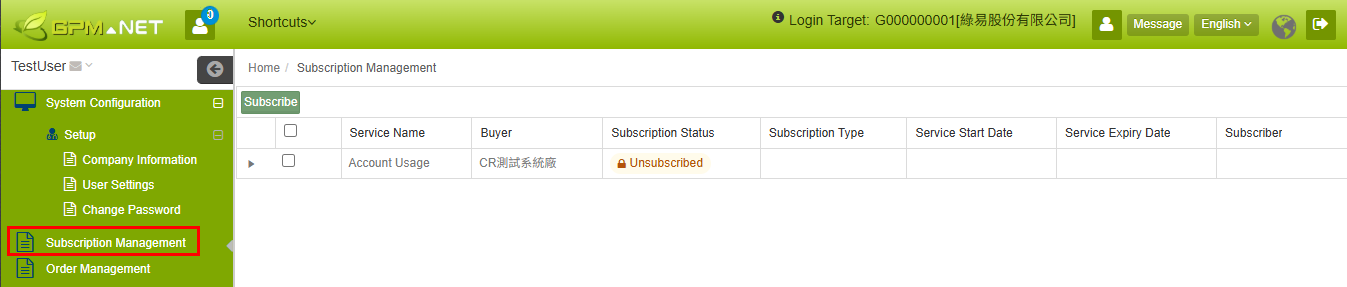
Field Description
Subscription Management List Page
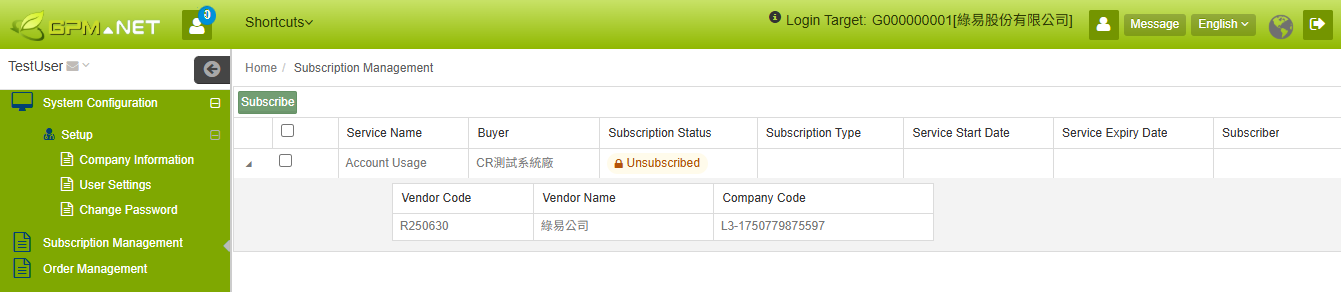
| Field/Button Name | Type | Description |
|---|---|---|
| Subscribe | Button | Starts the online paid subscription process for the selected service and redirects to the third-party payment page. |
| Service Name | Field | Displays the name of the service available for subscription, for example: Account Usage. |
| Buyer | Field | Displays the Buyer to which the service belongs. |
| Subscription Status | Field | Displays the current subscription status of the service, for example: Unsubscribed or Subscribed. |
| Subscription Type | Field | Displays the method used to subscribe to the service. |
| Service Start Date | Field | Displays the service subscription start date. |
| Service End Date | Field | Displays the service subscription end date. |
| Subscriber | Field | Displays the account of the person who performed or is associated with the subscription. |
| Supplier Code | Detail Field | Displayed after expanding the Service Name. Records the supplier code associated with the service. |
| Supplier Name | Detail Field | Displayed after expanding the Service Name. Records the supplier name associated with the service. |
| Company Code | Detail Field | Displayed after expanding the Service Name. Records the company code associated with the service. |