Order Management
 Order Management
This guide helps users understand the field meanings and button purposes on the Order Management page.
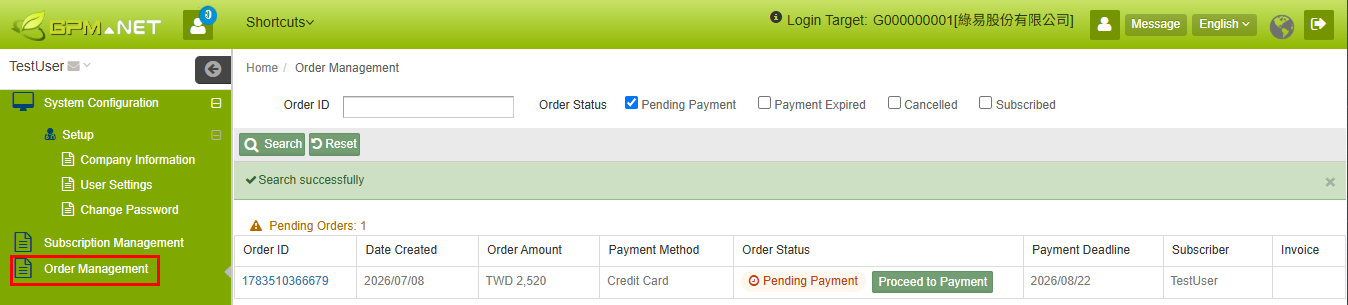
Field Description
Search Page Fields
| Field/Button | Type | Description |
|---|---|---|
| Order ID | Input Field | Enter the Order ID to search for a specific order. |
| Order Status | Filter Criteria | Used to filter orders by order status. |
| Search | Button | Executes the search based on the Order ID and Order Status criteria. |
| Reset | Button | Clears or restores the search criteria. |
| Order ID | Field/Link | Displays the Order ID. Click the Order ID to open the order details window. |
| Date Created | Field | Displays the order creation date. |
| Order Amount | Field | Displays the order amount and currency. |
| Payment Method | Field | Displays the payment method selected for the order. |
| Order Status | Field | Displays the current order status, for example "Pending Payment". |
| Payment Deadline | Field | Displays the order payment deadline. |
| Subscriber | Field | Displays the person who created or subscribed to the order. |
| Invoice | Field | Click to view the invoice. |
Order Details Page Fields
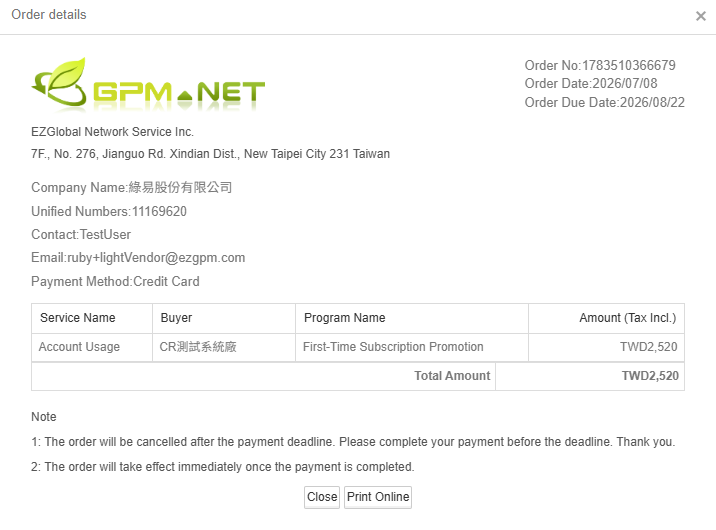
| Field/Button | Type | Description |
|---|---|---|
| Order ID | Field | Displays the unique order number. |
| Order Date | Field | Displays the order creation date. |
| Payment Deadline | Field | Displays the latest payment date for the order. |
| Company Name | Field | Displays the subscribing company name. |
| Unified Business Number | Field | Displays the company's unified business number. |
| Contact Person | Field | Displays the order contact person's name. |
| Field | Displays the contact person's email address. | |
| Payment Method | Field | Displays the payment method used for the order. |
| Service Name | Detail Field | Displays the subscribed service name. |
| Buyer | Detail Field | Displays the Buyer corresponding to the service. |
| Plan Name | Detail Field | Displays the Subscription Plan name. |
| Amount (Tax Incl.) | Detail Field | Displays the tax-included amount of the plan. |
| Total Amount Due | Summary Field | Displays the final amount payable for the order. |
| Close | Button | Closes the order details window. |
| Print Online | Button | Prints or exports the order details. |