Custom Form
 Instruction > Edit and Reply > Custom Form
Edition: Supply Chain Platform – Lite; Supply Chain Platform – Basic; Central Site.
Function
Buyers may issue all types of forms for suppliers to fill in.
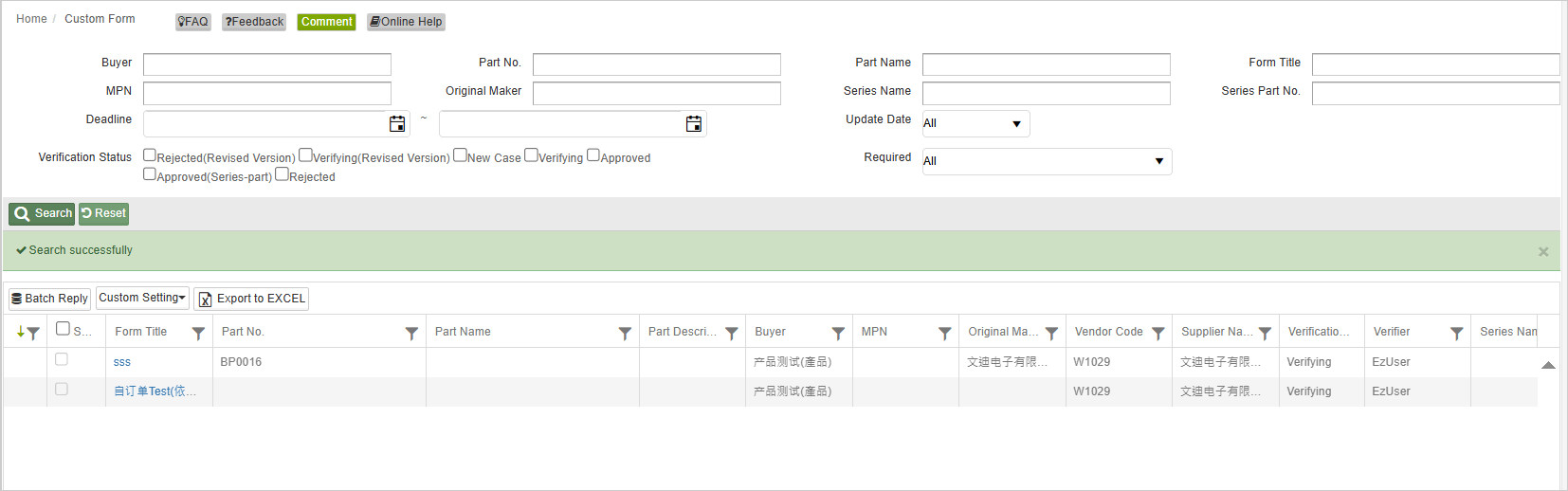
Main Page - Searching Columns
Searching Condition
You may search for certain Custom Form by setting different conditions. The instructions are as follows:
| Field | Description | Remark |
|---|---|---|
| Part No. | Also known as IPN. It is an identifier of a particular part design used in a particular industry and should be the same as that of ERP's. | |
| Part Name | Part Name, which is usually the same as ERP's | |
| Part Description | art Description, which is usually the same as ERP's.The buyer's name. | |
| Buyer | The buyer's name. | Suppliers will be able to distinguish different buyers' names should the platform be combined. |
| MPN | Manufacturer Part Number, a manufacturer-assigned number which is used to identify a product among other products from the same manufacturer. | |
| Original Maker | The maker of the part. | |
| Series Name | Same type of the part with same raw materials are series-part. Suppliers may set them as [Series] and set a [Series Name]. | |
| Required | Whether the form is required to be filled. | |
| Verification Status | The Verification Status of the MCD Survey. There are currently 7 types of the Verification Status. | |
| Deadline | A deadline calculated according to [Vendor Notification Settings]. (Should reply within X days after issued/reissued date; Should reply within Y days after rejection date; Document can be renewed Z days before expiration date.) Example: 2019/4/10 | |
| Update Date | The last modified time. |
Verification Status
There are currently 7 types of the Verification Status for Custom Form:
- New Case: The newly issued Custom Form.
- Verifying: The Custom Form completed and submitted by supplier.
- Approved: The Custom Form approved by the buyer.
- Approved(Series-part): The Custom Form approved by buyer based on the series part.
- Rejected: The Custom Form rejected and returned to supplier by buyer after verification.
- Rejected(Revised Version): The new version of the Custom Form issued and returned back to supplier for investigation.
- Verifying(Revised Version): The new version of the Custom Form completed and submitted by supplier.
You may search for all types of the Verification Status by selecting none/all of the boxes, or select the ones needed.
Click the  button to search, or the
  button to reset all settings.
Searching Results
For the searching results presented in the table below, you may:
- Click on the title of the selected field to sort by particular order.
- Use the filter
 to search for specific data.
 - Click
 to export the searching results in excel.
If you want to learn more about the detailed query functionality, please refer to the General User's Interface.
Button Description
| Button Name | Description | Remark |
|---|---|---|
| Batch Reply | Use [Batch Reply] to fill out and submit multiple similar forms simultaneously. |
Fill in Custom Form
-1e3e5030dd8f70d37ccece94fb29b93c.png)
Button Description
| Button Name | Description | Remark |
|---|---|---|
| Save | Save the data. | |
| Submit | Submit the MCD Survey. |
Columns and Description
| Column | Description | Remark |
|---|---|---|
| Supplier Memo | Supplier memo written by the supplier. | Optional |
Types of Forms
Columns required to be filled in different forms might be different according to a variety of forms issued by buyers.
- Single column to be filled with single line of text.
- Large column to be filled with multiple lines of text.
- Check box are for multiple choice questions.
- Click the calendar icon
 to select a date.
 - Click the
 icon to upload a file from your computer.